Runtime Promises - What AWS Lambda Was Hiding
Since August 2025, I've done four production migrations of different kinds, with two major ones changing the product runtime.
This post represents what I would have loved to have as a reference before starting one of these migrations: moving seven Python Lambdas into services on k8s. Having it would have made the transition smoother and more predictable.
Lambdas come with particular limits, like memory, execution time, ephemeral storage, and concurrency, and some are simply runtime behaviour, like recycling environments. These are what you could consider first-order characteristics of the system. There are also second-order characteristics, or what I'll call promises, which you should infer from the nature of your application and the transition. For example, Lambda recycles environments, so nothing lives long enough to go bad. Our code could have reused database engines or refreshed credentials, but it was never required to. In a long-running service, both became issues.
The old architecture, briefly
The Lambdas were the ingestion pipeline for external time-series data (the reasons we moved them are in Appendix B). Most of the Lambdas synced that data to different databases. Each sync Lambda did two things: extract and transform data into a form suitable for its target database(s), then write it. The extraction logic lived in a shared library, but most of the Lambdas still ran it on their own as part of every invocation, and the other three did their own slightly different extraction and also took care of a few other things like resampling.
The new architecture
Now there is one service for extraction and normalization. Each consumer is responsible for one or more target databases. Consumers get events over a shared contract, fetch the normalized payload from S3 and write it to their stores.
We rewrote the extraction service in Go. Static typing there was important for us in that piece of functionality, and since the rest of the platform is in Go, we could reuse internal libraries we already had.
Consumers depend on pandas, the Python ecosystem and our internal libraries. Rewriting them too would have made the migration longer and less predictable, so we kept them in Python.
We didn't clean up any code while moving it unless the migration needed it. We rolled it out through a staged canary, starting with test and anonymous traffic.
The four promises
The early tests went fine, even with several deliveries running at once. We started finding problems when we added more traffic and left the services running for days.
Each problem exposed something we'd been relying on Lambda for. I've grouped those dependencies into four promises.
- Blocking only hurt the caller
- Every delivery had the place to itself
- Nothing lived long enough to go bad
- The outside world saw a different you
Promise 1: Blocking only hurt the caller
On Lambda each concurrent delivery had its own execution environment.1 In the service, the deliveries in a process share one event loop.
We have four different types of consumers, and by the time we finished the rollout of the first, we were somewhat confident that the second wouldn't give us much trouble.
The fun started when we crossed the threshold of about half of the customers running on the new service: k8s kept restarting our container periodically due to the failing liveness probe. However, the service was running fine and didn't show any obvious failure symptoms.

The probe error ends with Client.Timeout exceeded while awaiting headers. The probe timed out waiting for response headers.
The issue lay in a synchronous database client called from async handlers. Client calls usually took seconds to finish and blocked the event loop for their whole duration. The service couldn't answer the liveness probe until the write finished.
On Lambda those same calls were fine: concurrent deliveries ran in separate environments, so a slow database write only blocked its own delivery. Once deliveries shared an event loop, they all had to wait.
We offloaded those database writes to a thread pool and stopped seeing the restarts. The same applied to CSV parsing and pandas resampling. Async code is only as async as its slowest sync call.
To spot sync dependencies proactively, check your database drivers and network-bound SDKs as well. For testing, run the service under load. Enabling asyncio debug mode also helps here. By default, it logs callbacks and task steps that take longer than 100 ms, giving you somewhere to start looking.
Promise 2: Every delivery had the place to itself
On Lambda each delivery also had its own memory, CPU, and /tmp. In the service they share the pod’s limits.
Once the second consumer was stable under normal traffic, we triggered a DLQ replay to process failed messages in batches. The container OOMed and restarted. As the replay continued, each new batch caused the same failure.
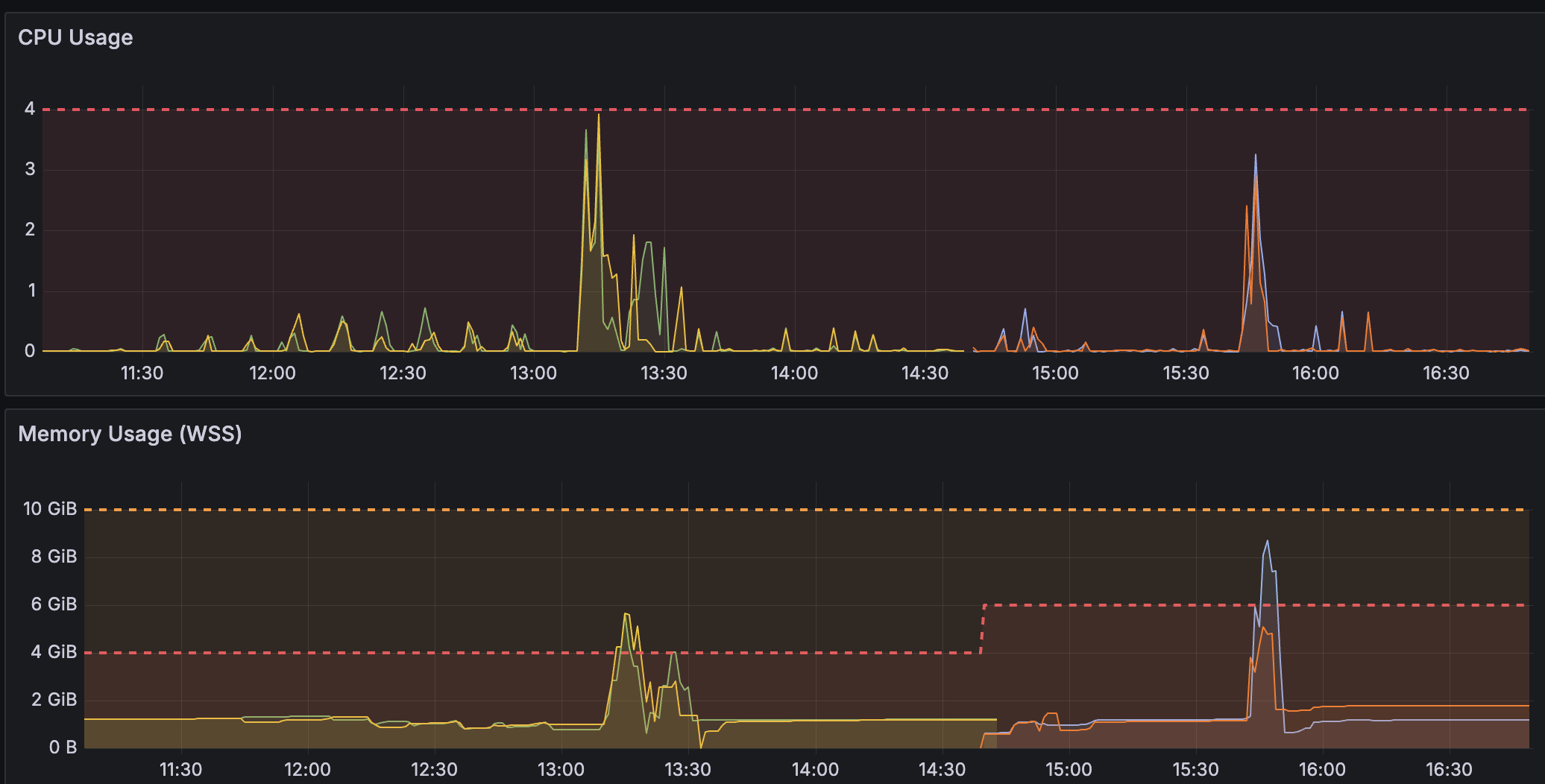
All our Python consumers were configured the same way: same pod count, same processes per pod, same prefetch count per process (we use RabbitMQ). We set concurrency to roughly match Lambda's concurrency, and this had worked for the first consumer.
However, isolation didn't transfer. The second consumer did much more work per delivery than the first. It had more bytes in flight with larger pandas dataframes and more database calls. Under normal traffic, the prefetch never filled. The DLQ replay filled it instantly, and the pod ran out of memory. Fixing Promise 1 made this easier to hit: with blocking calls off the event loop, each process could run more of this work at the same time.
To size prefetch, you need the peak additional memory one large delivery uses. Lambda's REPORT line includes Max Memory Used, but when invocations share an environment, it reports the maximum across all of them. So use a large delivery that ran first in a fresh environment (its REPORT line includes Init Duration), and subtract the function's memory right after init, which you can log at the end of the init code. Use this number, not the function's configured memory size, which is only a ceiling, and be sure to validate it in the service under load.
For the baseline, take the pod's memory in the service with all its processes running but idle.
concurrency per process = (memory limit per pod − baseline memory per pod − headroom) ÷ (processes per pod × peak additional memory per delivery)For example, with an 8 GiB pod limit, 768 MiB baseline, 768 MiB headroom, four processes and 200 MiB of additional memory per delivery:
concurrency = (8192 − 768 − 768) ÷ (4 × 200) = 8.32Round down to concurrency 8 per process. With four processes per pod and three pods:
3 pods × 4 processes × 8 prefetch = 96 deliveries in flightThis is a starting estimate to validate under load.
Lowering prefetch was our first step. Prefetch isn't a dedicated concurrency primitive. It limits how many unacknowledged messages the broker will deliver to a consumer. In our case, it acts like a semaphore around the whole delivery. It may be unnecessarily strict in how it limits memory, and you could potentially run at a higher concurrency than you otherwise would. For a precise limit, put the memory-heavy sections of the handler under a semaphore sized with the same formula. It has to cover the whole time the data is alive, so in a handler that holds large data for most of the delivery, prefetch already gets you most of the way.
In the service, deliveries on the same pod share a filesystem. We planned for this: each delivery writes to its own directory, named after the delivery UUID from upstream. But the source could send the same event more than once within tens of seconds, and the producer published each copy with the same UUID. When two copies arrived at the same pod at once, the second mkdir failed, and that's how we noticed the duplicates. They existed on Lambda too, but each copy ran in its own environment and the inserts were idempotent, so nothing failed and nobody noticed. We added a marker at the producer to reject later copies. Consumers still accept duplicates, since replaying from an older offset is how we recover from bugs.
Promise 3: Nothing lived long enough to go bad
A Lambda execution environment is short-lived. As noted earlier, it can be reused, but in our case it was gone before a process that stays up for days would have shown the problem. It's the complete opposite in a service, where a process stays running unless deployments or crashes intervene. You might have scheduled rotation, but it's nothing close to how Lambda operates.
Some time into testing, we noticed memory growing steadily across the pods. While a pod stayed running, its memory usage kept climbing rather than settling at a stable baseline.
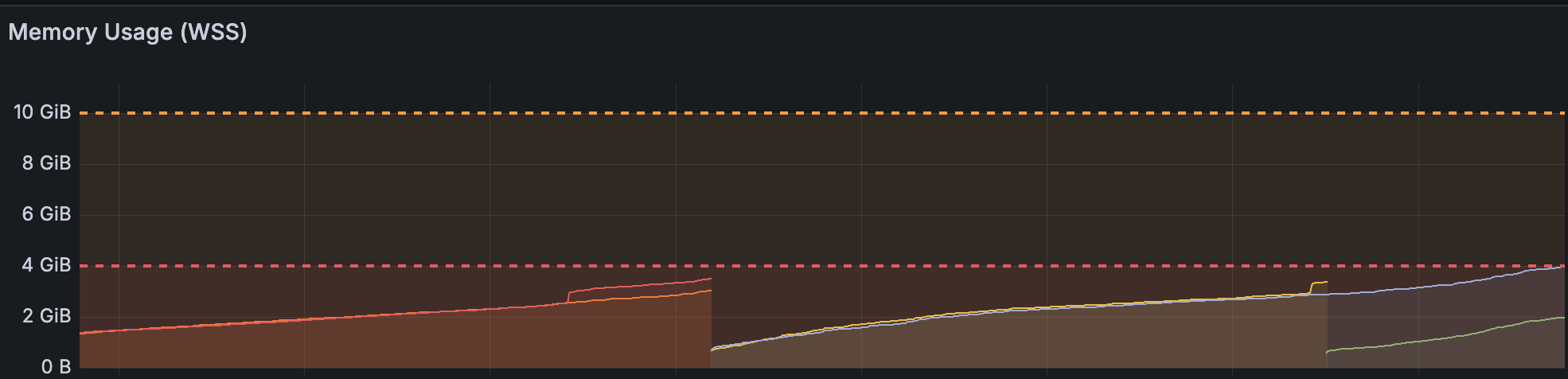
The first Lambda we migrated created a SQLAlchemy engine per request instead of reusing one across invocations. We corrected that during the migration but missed similar calls inside our internal library, which created several engines on every delivery.
At first sight, this didn't seem like a big problem, since they all disposed of their engines at the end.
tracemalloc pointed at SQLAlchemy. Our library created several engines per delivery and disposed of them at the end. None were left after garbage collection, but resident memory stayed high.
glibc, the C library that allocates memory for the process, kept some of the freed blocks for reuse. There was free memory, but some later allocations needed a size that did not fit those holes. glibc had to get more from Linux.
malloc_trim() could give the empty end of the heap back to Linux, but not the unused space on a page that still held a live allocation. We also tried a single glibc arena, but memory kept climbing.
After we switched to one engine per worker, that removed the biggest source of memory growth for our traffic. If you can't remove the churn at the source, a common workaround in Python is to recycle processes instead of pods. Gunicorn has max_requests, Celery has worker_max_tasks_per_child and worker_max_memory_per_child, and Python has ProcessPoolExecutor(max_tasks_per_child=...), all for exactly this purpose.
Even though it wasn't a visible problem on Lambda, the code shouldn't have created several engines per delivery. The engine should have been created outside the handler so it could be reused. Even on Lambda, every new engine meant new connections, each with a new TCP handshake and authentication.
The memory issue is not simply a bad pattern. It can have practical implications. Imagine you have memory-based autoscaling configured. You would see pods coming up, and new pods would only reinforce that pattern.
We also had a consumer that started failing intermittently when writing to a database. Some deliveries synced fine, while others failed with authentication errors.
The credentials came from Vault and rotated monthly. We fetched them at startup but never refreshed. After a rotation, the service was still trying to open connections with the old credentials. The pattern was intermittent because old connections in the DB pool didn't have to authenticate, but new connections did.
We called these credentials "static" to distinguish them from the short-lived ones. We'd already added periodic refresh for the short-lived credentials by that time, but overlooked the static ones. Of course they were also rotated, a month was just much longer than anything we tested.
Restarting the pod was the immediate fix because it fetched the current credentials. We then added a background task to refresh them while the service was running. We hadn't seen this on Lambda, where recycling the environment also refreshed the credentials.
Before the migration, analyze whether the code creates new engines, clients and sessions on every delivery when it could reuse them. Ask what happens when credentials, tokens, signed URLs or certificates expire while the service is still running.
I'd also log memory at the start of each invocation and follow one Lambda log stream. If that number keeps growing, it's worth finding out why before leaving that code running for days.
Promise 4: The outside world saw a different you
Our code barely changed in the migration, so it's easy to assume you’re the same client for the upstream services. On Lambda, in our setup, the calls to upstream came from at least three source addresses, and if a call failed, Lambda retried the whole invocation. After the migration, the same calls came from a couple of pods running many deliveries at once, and retries were up to us.
While moving customers over, calls to one of our internal services started failing with ServerDisconnectedError, signalling that the connection closed before we got a response. Our first thought was to add retries, because these looked like occasional disconnects.
We tried moving customers back and forth between Lambda and the service, and found the errors appeared only once more than half were on the service. Lambda didn't show any errors at any split.
When we looked at the code, the client created a new aiohttp.ClientSession for every call, with no shared connection limit across calls:
async with aiohttp.ClientSession() as session:
    async with session.post(url, json=payload) as resp:
        ...
We first suspected we were opening too many. We switched to one ClientSession per process, with a pool limited to 25 connections, and added retries with backoff. Both changes shipped together, and the errors stopped.
The pool change went in before we moved the blocking calls to threads. Looking at the upstream configuration afterwards, our best explanation is that the event-loop blocking also affected how quickly we sent requests. The upstream was a Go net/http server with a 10-second ReadHeaderTimeout. We would establish a TCP connection while the client’s event loop was busy with other deliveries. If those deliveries kept it busy for more than 10 seconds before it could send the headers, the upstream would close the connection.
How is this not an issue with the shared pool? Well, connections stay around for reuse. On an idle HTTP/1 connection, Go doesn’t start the header timeout until the first bytes of the next request arrive. So a delay before sending anything doesn’t go into that timeout the way it would on a new connection. You can see this in Go’s server implementation.
After the fact, I reproduced this locally against a Go server, using a shorter, two-second timeout. Blocking the loop for three seconds after connecting caused a disconnect, but reusing an established connection after the same delay succeeded. A local load test also produced failures with a session per call and none with a shared session. We didn't confirm back then that this was the cause in production, but it fits the configuration and the behaviour we observed.
You could also implicitly rely on Lambda's retries without knowing it. If your network call has no retries, you still rely on Lambda retrying your whole request again. Ensure you add retries to recover from transient failures without repeating the whole delivery.
So check whether HTTP clients reuse connections, what limits their pools have and when the upstream starts its timeouts. Ideally, test it with the concurrency you expect in production. Also check whether the network path or source addresses will change, especially if the upstream uses per-IP limits or allowlists.
How to make it reliable
The e2e tests we started with passed, including concurrent deliveries, so it's worth also testing the conditions that changed with the runtime.
For Python, you can run the service under load with asyncio debug mode enabled and the same liveness probes you intend to use in production.
Our memory problem took one to two days to show up, so a few hours in staging wouldn't have been enough. Leave the service running with traffic comparable to prod and watch its memory and error logs over time. How long to do this depends on the workflow and how expensive a failure would be to recover from.
Also test what happens at the boundaries: queues, databases, upstream services and anything providing credentials. For queues, it can be a DLQ replay. Don't wait until you need a production replay to find out whether the service can handle it.
For credentials that rotate periodically, trigger a rotation during the test and check that the service can open new connections afterwards. Also check reconnecting after an existing connection is lost.
For upstream services, try slow responses, timeouts and failed calls. You can use something like Shopify's Toxiproxy for this. It sits between the service and a dependency, allowing you to add latency or cut connections during a test. A pod killed during a delivery is another useful case, especially after it has written to a database but before it has acknowledged the message. Check what gets repeated on the next attempt and whether the result is still correct.
For the rollout, shadowing lets you send a copy of real traffic to the new system while the old one is also running. You can compare their outputs before relying on the new system, but it means twice as much work. For consumers like ours, which write to databases, we would also need new databases. Providing this infrastructure surely involves more coordination and hence more time, as well as more cost.
A canary rollout doesn't require that. At any given moment, you will still have the same amount of total traffic. It will just be distributed between the old and new systems. You move part of the traffic over, watch its behaviour and move it back if needed. That's the approach we used.
A canary doesn't have to use an off-the-shelf tool. Our routing was controlled by a config file in S3. It mapped customers to pipelines and consumers, so one customer could use pipeline A with consumers A and B, while another used pipeline B with consumers C and D. For our rollout, controlling which pipeline processed each delivery was enough. If traffic assigned to the old system must never reach the new service, the routing decision needs to happen upstream, before that traffic enters the service.
Lambda as a runtime contract
This migration highlighted that Lambda is a runtime contract, not just a deployment target. Concurrent deliveries had separate memory and filesystems, and each environment had its own pools and caches. Lambda handled retries for asynchronous invocations. In our case, environments were also recycled before the memory growth or monthly credential rotation caused visible problems. Most of this is documented somewhere – the filesystem and memory isolation, even the Lambda retries. Some of it isn't, like your environment getting its own pools and caches. But none of it is gathered into the one list that matters – the set of guarantees your code is quietly relying on.
Code written under that contract can rely on it, ignoring many best practices. The reliance shows up as missing code, and when the contract changes, the absences become bugs.
The Law of Leaky Abstractions says what's underneath your abstraction eventually shows through. With Lambda, it went the other way. Our bugs disappeared into the runtime. Lambda gave us fewer reasons to look at these parts of the code, but they still needed attention.
Before migrating, list what the current runtime provides out of the box for your code. Then check those assumptions against the new runtime to see what needs to change. Appendix A puts the checks from the four promises into one list.
Appendix A: Checklist
| Promise | What to check | How |
|---|---|---|
| Blocking only hurt the caller | Sync calls inside async handlers, including drivers, SDKs and pandas work | Enable asyncio debug mode and run a load test with liveness probes enabled. |
| Every delivery had the place to itself | Memory needed for a large delivery | For a large first invocation in a fresh environment, subtract memory after init from Max Memory Used. Validate the estimate in the service. |
Shared paths in /tmp | Look at how files and directories are named. Try processing two copies of the same event at once. | |
| Duplicate deliveries | Log the event ID once per invocation, then look for IDs that appear more than once. | |
| Nothing lived long enough to go bad | Engines, clients and sessions created per delivery | Find where they're created, including inside internal libraries. See which ones could be kept and reused. |
| Credentials, tokens, signed URLs and certificates | Find their expiry times and how the service gets replacements. | |
| Memory between deliveries | Log memory before each invocation. Follow one Lambda log stream to see whether it keeps growing. | |
| The outside world saw a different you | HTTP sessions and connection limits | Count the sessions per process and check how many connections each pool allows. |
| Source addresses | Find out which addresses the upstream sees. Check any per-IP limits or allowlists against those addresses. | |
| Retries outside the handler | Look up the trigger's retry settings. Check logs for event IDs that failed and later succeeded. |
Appendix B: Why we migrated
- Deployment consistency. The rest of the platform was already on k8s, and the Lambdas were the only part we released differently, which meant keeping a second setup working in every environment and region.
- Cognitive load. We had seven Lambdas and an orchestration between them, and tracing what happened to one event took more effort than the actual work the system was doing. New devs couldn't catch up quickly and required more time to internalize the system.
- Non-functional bottlenecks. The data grew, and for some functionality, Lambda's cap of 15 minutes wasn't enough. We found ourselves trying to work around that, and although it was possible, we didn't want to think about non-functional limits like this.
1. Throughout this post, Lambda means its default compute type. Lambda Managed Instances can run several invocations in one environment at once, so some of these promises don't hold there.